
Embark on a journey into the world of room planning, where creativity meets functionality to transform spaces. Discover the art of optimizing room layouts and design with the help of innovative tools and software.
Explore the various types of room planners, learn how to make the most of them, and uncover the countless benefits that come with efficient room planning.
What is a Room Planner?
A Room Planner is a tool or software that allows individuals to design and layout a room or space virtually before making any physical changes. It helps users visualize and plan how furniture, decor, and other elements will fit within a space.
Using a room planner is important as it can save time, money, and effort by helping users avoid costly mistakes or rework. It enables individuals to experiment with different layouts, colors, and styles to find the best design that suits their needs and preferences.
Benefits of using a Room Planner
- Planning furniture arrangement: Room planners can help users determine the best layout for furniture in a room, taking into account factors like traffic flow, functionality, and aesthetics.
- Visualizing design ideas: Users can experiment with different design options, such as color schemes, furniture styles, and decor elements, to see how they will look in the actual space.
- Space optimization: Room planners can assist in maximizing the use of space by ensuring efficient placement of furniture and accessories, making the room more functional and visually appealing.
- Budget management: By planning ahead with a room planner, individuals can make informed decisions about purchases, avoiding unnecessary expenses and ensuring a cohesive design within their budget.
Types of Room Planners
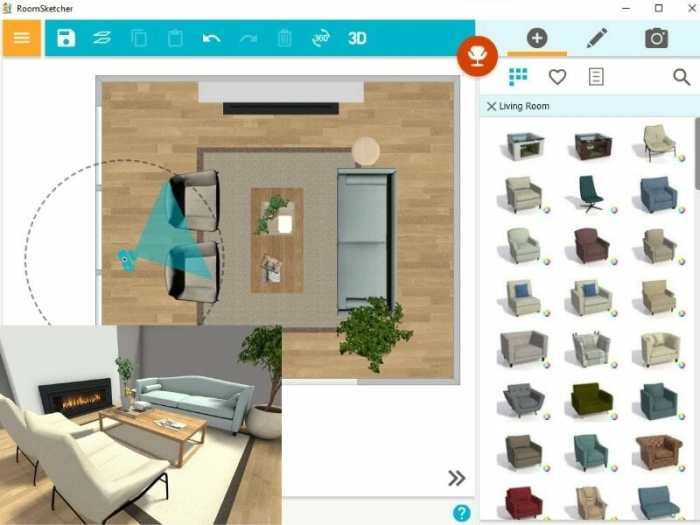
When it comes to room planners, there are several types available to cater to different needs and preferences. Each type offers unique features and functionalities to help users visualize and design their spaces effectively.
2D Room Planners
D room planners are basic tools that allow users to create floor plans and layout designs in two dimensions. Users can easily drag and drop furniture, appliances, and other elements onto the floor plan to see how they fit within the space.
Some popular examples of 2D room planners include Roomstyler, Floorplanner, and SmartDraw.
3D Room Planners
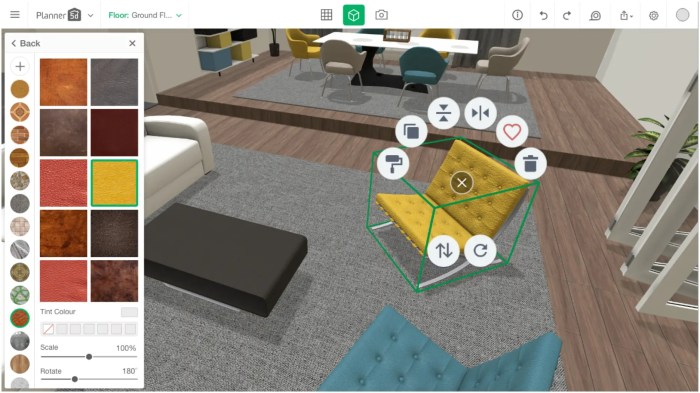
D room planners take things a step further by providing a three-dimensional view of the room design. This allows users to get a more realistic representation of how the space will look once it's fully furnished. Users can explore different angles and perspectives to better visualize their design.
Examples of 3D room planners include Planner 5D, HomeByMe, and RoomSketcher.
Virtual Reality (VR) Room Planners
VR room planners offer an immersive experience by allowing users to design and explore their rooms in virtual reality. This type of room planner provides a more interactive and engaging way to plan and visualize room designs. Users can walk through their virtual rooms, make real-time changes, and experience their designs in a more lifelike manner.
Some examples of VR room planners include IKEA Place and DecorMatters.
Online Room Planners
Online room planners are web-based tools that allow users to design rooms without the need for any software installation. These tools are convenient and accessible, making it easy for users to create and share their designs from any device with an internet connection.
Popular online room planners include Roomle, Homestyler, and Space Designer 3D.
How to Use a Room Planner
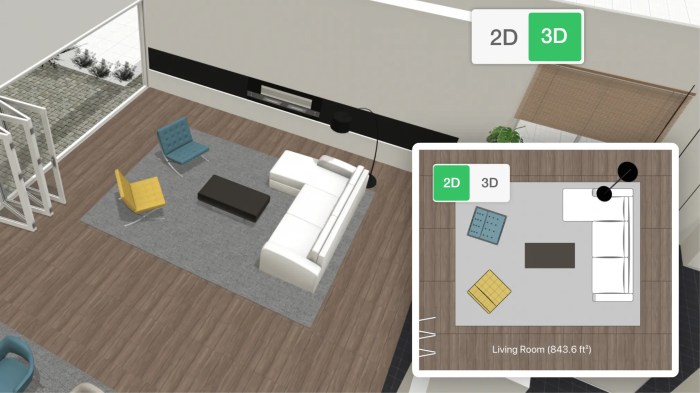
Using a room planner can help you visualize and design your space effectively. Follow these steps to make the most out of a room planner:
Step-by-Step Process:
- Create a Rough Layout: Begin by inputting the dimensions of your room and creating a basic layout.
- Add Furniture: Choose furniture pieces from the library and place them in the room according to your preference.
- Experiment with Placement: Play around with the arrangement of furniture to find the best layout for your space.
- Add Decor and Accessories: Include decor elements like rugs, curtains, and lighting to complete the look of your room.
- View in 3D: Many room planners offer a 3D view option to visualize your design more realistically.
Customization Options Available:
- Color Schemes: Customize the colors of walls, furniture, and decor to match your style.
- Textures and Patterns: Experiment with different textures and patterns to see how they complement each other.
- Room Shapes: Some room planners allow you to change the shape and size of the room to explore various possibilities.
- Virtual Tours: Take a virtual tour of your designed space to get a better sense of the layout.
Tips for Optimizing the Use of a Room Planner:
- Measurements Matter: Ensure accurate measurements of your room and furniture to create a realistic layout.
- Balance Functionality and Aesthetics: Focus on both practicality and visual appeal when designing your space.
- Experiment Freely: Don't be afraid to try different layouts and styles before settling on the final design.
- Seek Inspiration: Look for inspiration from interior design websites, magazines, or social media to spark your creativity.
- Collaborate: If designing a shared space, involve others in the planning process to gather different perspectives.
Benefits of Room Planning

Room planning offers numerous advantages that can greatly enhance organization and efficiency in various spaces. By utilizing a room planner, individuals can optimize their layout and design to suit their specific needs and preferences, resulting in a more functional and aesthetically pleasing environment.
Enhanced Organization
Room planning allows individuals to carefully consider the placement of furniture, fixtures, and decor items in a space. By visualizing the layout in advance, it becomes easier to create designated areas for different activities, maximize storage options, and ensure a clutter-free environment.
This leads to improved organization and a more streamlined living or working space.
Increased Efficiency
Effective room planning can help optimize the flow of a room, making it easier to navigate and utilize the space efficiently. By strategically arranging furniture and accessories, individuals can create a more ergonomic and functional environment that supports their daily activities.
This can lead to increased productivity, reduced waste of time and energy, and an overall smoother experience within the space.
Success Stories
Many individuals have shared success stories and testimonials related to the benefits of room planning. For example, by using a room planner to reorganize their living room layout, some have reported feeling more relaxed and comfortable in their home. Others have found that better organization in their workspace has improved focus and productivity throughout the day.
These real-life examples showcase how room planning can have a positive impact on daily life and well-being.
Last Recap
As we conclude our exploration of room planning, remember that a well-designed space can not only enhance aesthetics but also improve productivity and overall well-being. Embrace the power of room planning to create spaces that truly reflect your unique style and personality.
Top FAQs
What are the benefits of using a room planner?
Room planners help visualize design ideas, optimize space utilization, and streamline the interior design process.
How can room planning enhance organization?
By allowing for accurate furniture placement and layout adjustments, room planning contributes to better organization and functionality within a space.
Are there any success stories related to room planning?
Many individuals have shared how room planning transformed their living spaces, leading to increased comfort and satisfaction with their homes.